
 edeale
MacBook External Monitors: Why Resolution Math Actually Matters
A cheap 1440p external monitor plugged into a MacBook often looks noticeably blurrier than the built-in screen, and it's not the monitor's fault. It's a scaling mismatch.
macOS renders most external displays at a scaled resolution designed for Retina-class pixel density. A 27-inch 4K panel matches that scaling cleanly, while a standard 1440p panel at the same size often looks noticeably softer for text. This roundup compares three real 4K USB-C monitors that handle both the resolution and single-cable connection cleanly.
- Why 4K at 27 inches matches macOS scaling better than 1440p
- Three real single-cable USB-C monitor listings compared
- How much Power Delivery wattage you actually need
- Honest pros and cons for each pick
- What to check before buying any MacBook external monitor
This roundup is part of edeale's Electronics & Tech Deals coverage. Check the live listings below for current pricing.
Pick 1: Best Value Single-Cable Setup
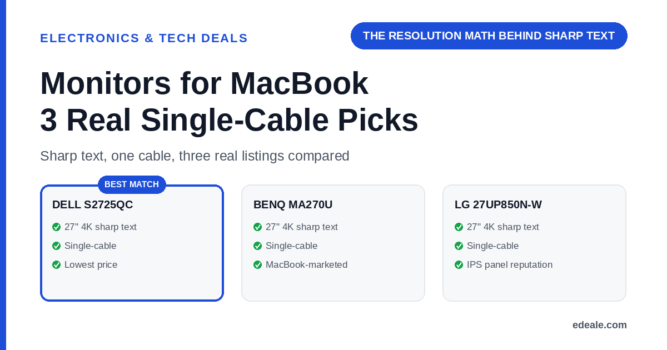
Dell S2725QC 27-inch 4K Ultra HD Monitor, USB-C, 65W Power Delivery

A 27-inch 4K Ultra HD display from Dell with USB-C connectivity and 65W Power Delivery, enough to charge most MacBook models through the same cable that carries video.
Pick 2: Explicitly Marketed for MacBook Use
BenQ MA270U 27-inch UHD 4K Monitor, USB-C, Compatible with MacBook Pro and MacBook Air

A 27-inch 4K UHD monitor from BenQ specifically listed as compatible with MacBook Pro and MacBook Air, at a higher price point than the other two picks.
Pick 3: Best Panel Reputation
LG 27UP850N-W 27-inch 4K IPS UHD Monitor, USB-C, 60W Power Delivery

A 27-inch 4K IPS UHD monitor from LG with USB-C and 60W Power Delivery, from a brand with a strong general reputation for monitor panel quality.
The pixel density of a 27-inch 4K panel closely matches how macOS scales external displays by default, producing sharp text without needing manual scaling adjustments. A larger 4K panel at 32 inches or more has lower pixel density and won’t look as sharp at the same default scaling setting.
How Much Power Delivery Wattage Do You Actually Need?
65W Power Delivery, as offered by the Dell pick, comfortably charges most MacBook Air models and covers lighter MacBook Pro use, though a 16-inch MacBook Pro under heavy load may still want its original higher-wattage charger. 60W, as on the LG pick, is very close but worth checking against your specific model's charging requirements. edeale's USB-C PD wattage guide covers how to match wattage to your exact device.
The Dell S2725QC offers the best combination of price and single-cable convenience for most MacBook users. The BenQ is worth the premium if explicit MacBook marketing and support matter to you, and the LG is a solid choice if IPS panel reputation is your priority.
- All three are 27-inch 4K panels, matching macOS’s default Retina-style scaling for sharp text without manual adjustment
- Single USB-C cable handles video and charging together on all three, genuinely simplifying desk setup versus separate HDMI and power cables
- Power Delivery wattage across all three (60-65W) covers most MacBook Air and lighter MacBook Pro charging needs
- None of the three PD wattages fully cover a 16-inch MacBook Pro under sustained heavy load — check edeale’s PD wattage guide against your specific model
- The BenQ carries a meaningfully higher price for its explicit MacBook marketing, which may not be necessary if the Dell or LG already meet your needs
- As with any USB-C monitor, cable quality affects whether you get the full rated Power Delivery wattage
What to Check Before Buying
What to Check Before You Buy
Monitors for MacBook: Frequently Asked Questions
Why does a 1440p monitor look blurrier than my MacBook's screen?
macOS scales most external displays for Retina-style sharpness, and a 27-inch 4K panel matches that scaling more cleanly than a lower-resolution panel at the same size.
Do I need exactly 27 inches for sharp text?
27-inch 4K is a commonly recommended sweet spot for macOS scaling, though other size and resolution combinations can also work well — check the specific pixel density if you’re considering a different size.
Will a 65W USB-C monitor fully charge my MacBook Pro?
It depends on your specific model. 65W comfortably covers MacBook Air and lighter MacBook Pro use, but a 16-inch MacBook Pro under heavy load may need its original higher-wattage charger.
Can I use one USB-C cable for both video and charging?
Yes, that’s the main convenience of these monitors — a single cable carries both video signal and power delivery to your MacBook.
Is the BenQ worth the extra cost over the Dell or LG?
Only if explicit MacBook marketing and support matter to you specifically — the underlying resolution and scaling benefits are similar across all three picks.
Do these monitors work with MacBooks that only have Thunderbolt ports?
Yes, USB-C and Thunderbolt ports on modern MacBooks are physically compatible with USB-C monitor cables, though check specific bandwidth requirements for very high refresh rate use.
What happens if my cable isn't rated for the monitor's full wattage?
Charging will be slower or may not work at full monitor-rated speed — always use the cable included with the monitor, or one rated for its full stated wattage.
What should I check before buying any MacBook external monitor?
Resolution matched to screen size for sharp text, Power Delivery wattage against your specific MacBook model, and the included cable’s rated wattage.
Key Takeaways
- 27-inch 4K matches macOS scaling for sharp text. A lower-resolution panel at the same size often looks noticeably softer.
- Single USB-C cable genuinely simplifies your desk. Video and charging combine into one cable across all three picks.
- Check PD wattage against your specific MacBook. A 16-inch MacBook Pro under heavy load may need more than 60-65W.
- The Dell offers the best value of the three. The BenQ’s premium is mainly for explicit MacBook marketing and support.
- Cable quality affects real-world charging speed. Use the included cable or one rated for the monitor’s full wattage.
For more real, verified picks across categories, see edeale's best wireless earbuds deals, best student laptop deals, and best streaming device deals.
edeale also tracks the Electronics & Tech Deals hub, the best VPN deals, and the best camera drones under $300 roundup, plus edeale's live, verified deals feed.
edeale also compares budget vs premium products and checks product compatibility before an accessory purchase becomes a return.
See Today's Verified Electronics Deals
Check edeale’s live, verified deals feed for current monitor and MacBook accessory pricing.
Conclusion
Any of these three 27-inch 4K USB-C monitors fixes the two real MacBook external-display problems: blurry text from resolution mismatch and desk clutter from separate video and power cables. Check Power Delivery wattage against your specific MacBook model before deciding between them.