
 edeale
Refresh Rate: The Spec You Notice Immediately or Not at All
Some people switch from 60Hz to 144Hz and can't explain what changed, just that everything feels smoother. Others genuinely don't notice a difference at all.
Refresh rate measures how many times per second a monitor redraws the image, and its real-world impact depends heavily on what you’re actually doing on screen. This guide breaks down what each common tier actually changes, and which is worth paying extra for based on your use case rather than the number alone.
- What refresh rate actually measures, in plain terms
- The real difference between 60Hz, 144Hz, and 240Hz
- Why refresh rate needs a matching graphics card to matter
- Whether refresh rate matters for office and general use
- What variable refresh rate (G-Sync/FreeSync) adds on top
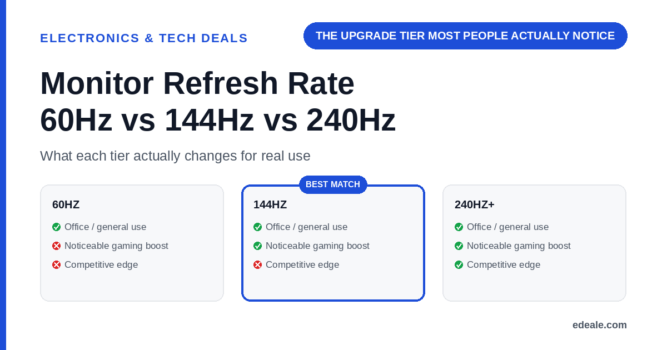
60Hz is fine for office work, browsing, and general use where fast motion isn’t a factor. 144Hz is the most noticeable upgrade tier for gaming and makes everyday scrolling and cursor movement feel smoother too. 240Hz and above are for competitive gaming specifically, where the gains beyond 144Hz are real but smaller and matter most in fast-paced, competitive titles.
What Refresh Rate Actually Measures
Refresh rate is how many times per second the monitor redraws the full image, measured in hertz (Hz). A 60Hz monitor redraws 60 times per second; a 144Hz monitor redraws 144 times per second. Higher refresh rates show motion more smoothly because there's less time between each frame update, which is why fast-moving content, like scrolling text or on-screen gameplay, looks noticeably different across tiers while a mostly static desktop shows less obvious difference.
What Each Tier Actually Changes
Refresh Rate Tiers Compared
A 144Hz monitor only shows 144 frames per second if your graphics card can actually render that many frames in the game you’re playing. Pairing a high refresh monitor with a graphics card that struggles to hit even 60 frames per second in demanding titles won’t deliver the smoothness the monitor is capable of.
Does Refresh Rate Matter for Office Use?
Refresh rate isn't purely a gaming spec. Many people who upgrade to 144Hz for gaming notice that everyday tasks like scrolling web pages and moving the cursor also feel smoother, since those actions benefit from the same faster redraw rate. It's a smaller, more subtle improvement than the gaming difference, and not usually worth paying a significant premium for on its own, but it's a genuine secondary benefit if you're already considering the upgrade for other reasons.
What Variable Refresh Rate Adds
Variable refresh rate technology (Nvidia's G-Sync or AMD's FreeSync) synchronizes the monitor's refresh rate to match your graphics card's actual frame output in real time, which reduces screen tearing and stuttering, particularly when frame rates fluctuate. This is a separate feature from the maximum refresh rate number, and worth checking for specifically if you play games where frame rate varies rather than staying pinned at a fixed number.
Monitor Refresh Rate: Frequently Asked Questions
Is 144Hz worth it over 60Hz for gaming?
Generally yes, it’s the most noticeable single upgrade tier for gaming smoothness, assuming your graphics card can actually reach frame rates near 144 in your games.
Is 240Hz noticeably better than 144Hz?
The gain exists but is smaller and more specific to fast-paced competitive gaming than the jump from 60Hz to 144Hz.
Does refresh rate matter for office work and browsing?
It’s a smaller, secondary benefit — scrolling and cursor movement feel smoother at higher refresh rates, but it’s not usually worth a big premium for office use alone.
Do I need a powerful graphics card to benefit from a 144Hz monitor?
Yes, to see the full benefit you need a graphics card capable of rendering frames at or near 144 frames per second in the specific games or applications you use.
What is variable refresh rate (G-Sync/FreeSync)?
A feature that synchronizes the monitor’s refresh rate to your graphics card’s actual frame output, reducing screen tearing and stuttering when frame rates fluctuate.
Is a higher refresh rate monitor worth it for watching video?
Most video content is filmed and delivered at standard frame rates, so the benefit for passive video watching is much smaller than for gaming or fast on-screen motion.
Can I use a 144Hz monitor with a laptop that can't output that refresh rate?
The monitor will only display up to whatever refresh rate your connected device and cable can actually output, so check compatibility before assuming full 144Hz performance.
What refresh rate is best for casual, non-competitive gaming?
144Hz offers a genuinely noticeable improvement for most casual gaming without needing the graphics card horsepower that 240Hz gaming typically demands.
Key Takeaways
- 60Hz is fine for office work and general use. Fast-paced gaming is where higher refresh rates show their biggest benefit.
- 144Hz is the most noticeable upgrade tier. Worth it for most gaming use cases, and a smaller everyday benefit too.
- 240Hz+ is for competitive gaming specifically. The gain over 144Hz is real but smaller and more specialized.
- Your graphics card needs to keep up. A high refresh monitor only helps if your hardware can actually hit those frame rates.
- Variable refresh rate is a separate, worthwhile feature. Check for G-Sync or FreeSync support alongside the maximum refresh rate number.
For more real, verified picks across categories, see edeale's best wireless earbuds deals, best student laptop deals, and best streaming device deals.
edeale also tracks the Electronics & Tech Deals hub, the best VPN deals, and the best camera drones under $300 roundup, plus edeale's live, verified deals feed.
edeale also compares budget vs premium products and checks product compatibility before an accessory purchase becomes a return.
See Today's Verified Electronics Deals
Check edeale’s live, verified deals feed for current monitor and gaming display pricing.
Conclusion
Refresh rate matters most for gaming and fast-moving content, with 144Hz offering the biggest practical upgrade over 60Hz for most people. Match your choice to your graphics card’s actual capability and your specific use case, rather than assuming a higher number is automatically worth the premium.