
 edeale
Phone Storage: Why the 'Storage Full' Warning Keeps Coming Back
Deleting a few photos to clear a storage warning is a temporary fix. The warning usually returns within weeks because the underlying habit didn't change.
Phone storage needs depend far more on photo and video habits than on the number of apps installed, since a single minute of 4K video can outweigh dozens of typical apps combined. This guide breaks down realistic storage needs by usage pattern, and covers when upgrading tiers actually solves the problem versus when cloud storage or habit changes are the better fix.
- What actually fills up phone storage, and what doesn't
- Realistic storage tiers by usage habit
- When cloud storage solves the problem better than a bigger phone
- A quick way to check what's actually taking up your space
- Whether it's worth paying extra for the largest storage tier upfront
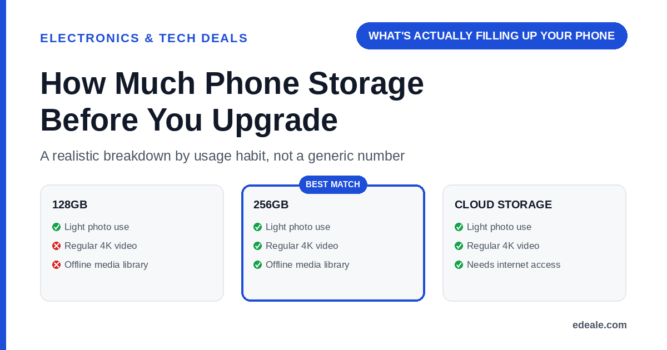
128GB is a reasonable baseline for most users who take regular photos and use social apps without heavy video recording. 256GB suits anyone who records 4K video regularly or keeps a large downloaded media library. Beyond that, cloud storage subscriptions are usually cheaper than paying the premium for the largest built-in tier, unless offline access is a hard requirement.
What Actually Fills Up Phone Storage
Apps themselves are rarely the problem on a modern phone, since most are a few hundred megabytes at most. The real space consumers are photos, and especially video: a minute of 4K footage at a typical frame rate can run 300-400MB, meaning a handful of videos can eat several gigabytes without you noticing. Downloaded offline media (music, shows, podcasts) and app caches that build up silently over months are the next biggest factors, ahead of the apps themselves.
Realistic Storage Needs by Usage Habit
Storage Needs by Usage Habit
Most phones have a settings menu showing exactly what’s taking up space by category. Often, clearing app caches or offloading old videos to cloud storage solves the problem without needing to upgrade the physical storage tier at all.
Cloud Storage vs. a Bigger Storage Tier
A cloud storage subscription is almost always cheaper over time than paying the upfront premium for the largest built-in storage tier, and it also protects your photos and videos if the phone is lost or damaged. The trade-off is that cloud-stored media typically needs an internet connection to access in full quality, which matters if you regularly need offline access, such as on flights or in areas with unreliable signal. If offline access isn't a regular need, cloud storage is usually the more cost-effective solution.
Phone Storage: Frequently Asked Questions
Is 128GB enough phone storage in 2026?
For most users with moderate photo and light video habits, yes. Heavy 4K video recorders or large offline media libraries will likely need more.
What actually takes up the most phone storage?
Video, especially 4K footage, followed by photos and downloaded offline media. Apps themselves are rarely the main factor on a modern phone.
Is cloud storage cheaper than buying a bigger storage tier?
Usually, over time, yes. The upfront premium for the largest built-in storage tier often costs more than years of a cloud storage subscription.
Do I need offline access to my photos and videos?
Only if you regularly go without a reliable internet connection, such as during travel. Otherwise, cloud storage with full-quality access when connected is usually sufficient.
How do I check what's taking up space on my phone?
Check your phone’s storage settings menu, which typically breaks down usage by category (photos, apps, system, other) so you can identify the actual cause.
Should I buy the largest storage tier just to be safe?
Only if you specifically expect heavy video recording or need offline media access regularly. Otherwise, a mid-tier option paired with cloud backup is usually more cost-effective.
Does deleting apps free up meaningful storage?
Usually not much, since most apps are small compared to photo and video files. Clearing app caches and offloading media typically frees up more space.
What storage tier is best for heavy 4K video recording?
256GB or more, or a workflow that regularly offloads recorded footage to cloud storage or a computer to free up space.
Key Takeaways
- Video, not apps, is the main storage consumer. A few minutes of 4K footage can outweigh dozens of typical apps combined.
- 128GB suits most moderate users. 256GB or more is worth it specifically for heavy video recording or offline media libraries.
- Cloud storage is usually cheaper than a bigger tier. Unless offline access is a genuine, regular requirement.
- Check your actual storage breakdown first. Clearing caches and offloading old media often solves the problem without upgrading.
- Match the tier to your habits, not a generic recommendation. Light users can overpay significantly on storage they’ll never fill.
For more real, verified picks across categories, see edeale's best wireless earbuds deals, best student laptop deals, and best streaming device deals.
edeale also tracks the Electronics & Tech Deals hub, the best VPN deals, and the best camera drones under $300 roundup, plus edeale's live, verified deals feed.
edeale also compares budget vs premium products and checks product compatibility before an accessory purchase becomes a return.
See Today's Verified Electronics Deals
Check edeale’s live, verified deals feed for current phone and storage accessory pricing.
Conclusion
Phone storage needs come down to video habits more than anything else. 128GB covers most moderate users, 256GB or more suits heavy video recorders, and cloud storage is usually the more cost-effective fix if offline access isn’t a regular requirement.