
 edeale
RAM: The Spec That's Easy to Both Overpay For and Underbuy
8GB feels like it should be enough in 2026. For a browser with 30 tabs open next to a video call, it often isn't.
RAM requirements depend far more on how many applications run simultaneously than on any single app’s own demands. This guide breaks down realistic RAM needs by actual use case rather than a generic recommendation, since a college student writing essays and a student doing video editing coursework have genuinely different requirements despite both being ‘college’ use cases.
- What RAM actually does, in plain terms
- Realistic RAM needs by use case: browsing, office work, coding, creative work
- Why more RAM doesn't always mean better performance
- Whether upgradeable RAM is worth prioritising when buying
- A quick way to check if your current RAM is actually the bottleneck
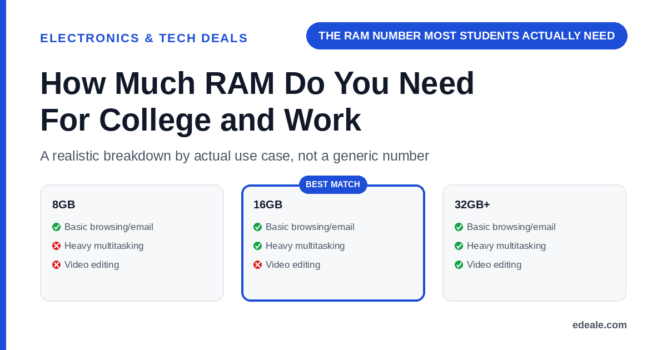
8GB is the realistic minimum for basic browsing, word processing, and light multitasking. 16GB is the more comfortable baseline for most college and office work in 2026, especially with browser tabs, video calls, and office software running together. 32GB or more is worth it specifically for video editing, large dataset work, or running multiple virtual machines, not for general use.
What RAM Actually Does
RAM holds the data your active applications need immediate access to. When it fills up, your system starts swapping data to slower storage, which is the actual cause of the stuttering and lag people associate with 'running out of RAM.' It's not about any single app being demanding, it's about how many things are open and how much each one is holding in memory at once. That's why a college student with 40 browser tabs and a study guide app open can hit the same wall as someone doing genuinely intensive work, despite using much simpler software.
Realistic RAM Needs by Use Case
RAM Needs by Use Case
RAM addresses one specific bottleneck: how many things can run at once without swapping to slower storage. It won’t speed up a genuinely underpowered processor, and it won’t compensate for a slow hard drive instead of an SSD. Check all three specs together rather than assuming extra RAM alone solves a sluggish laptop.
Is Upgradeable RAM Worth Prioritising?
Many current thin-and-light laptops solder RAM directly to the motherboard, which means whatever configuration you buy is permanent. If a laptop offers user-upgradeable RAM via accessible slots, that's genuinely worth a small price premium if you're unsure whether 16GB will be enough long-term, since it gives you a path to add more later rather than needing a new machine. Check this specifically before buying if future-proofing matters to your budget.
RAM Requirements: Frequently Asked Questions
Is 8GB of RAM enough for college in 2026?
It’s workable for basic browsing and word processing, but 16GB is the more comfortable baseline once you factor in multiple browser tabs, video calls, and multitasking.
Do I need 32GB of RAM for college coursework?
Usually not, unless your coursework involves video editing, 3D modelling, or handling large datasets. For most students, 16GB covers typical multitasking comfortably.
Does more RAM make my laptop faster overall?
Only up to the point where you stop running out of it. Beyond that, RAM doesn’t improve processor speed or storage performance, which are separate bottlenecks.
Can I upgrade RAM later if I buy 8GB now?
Only if the laptop has accessible, upgradeable RAM slots rather than RAM soldered to the motherboard. Check this specifically before buying if you’re unsure about future needs.
How do I know if RAM is actually my laptop's bottleneck?
Check your system’s task manager or activity monitor for memory usage during normal use. If it’s consistently near full capacity with typical multitasking, more RAM would likely help.
Is 16GB enough for basic coding coursework?
Generally yes, for standard coursework. If you’re regularly running virtual machines or multiple containers alongside your code editor, 32GB is a safer choice.
Does RAM speed (not just capacity) matter?
It matters less than capacity for most everyday tasks, though faster RAM can offer a small improvement in memory-intensive workloads specifically.
What's the safest RAM choice if I'm not sure what I'll need?
16GB covers the large majority of college and office use cases comfortably. If your laptop supports upgradeable RAM, that also gives you room to add more later.
Key Takeaways
- 16GB is the realistic comfortable baseline for 2026. 8GB works for very light use but hits limits fast with normal multitasking.
- 32GB is for specific heavy workloads, not general use. Video editing, 3D work, and large datasets are where it genuinely pays off.
- More RAM won't fix a slow processor or hard drive. Check all three specs together rather than treating RAM as a universal fix.
- Check for upgradeable RAM if you're unsure of future needs. Soldered RAM configurations are permanent once purchased.
- Match RAM to actual multitasking habits, not just software names. How many things run at once matters more than any single app’s requirements.
For more real, verified picks across categories, see edeale's best wireless earbuds deals, best student laptop deals, and best streaming device deals.
edeale also tracks the Electronics & Tech Deals hub, the best VPN deals, and the best camera drones under $300 roundup, plus edeale's live, verified deals feed.
edeale also compares budget vs premium products and checks product compatibility before an accessory purchase becomes a return.
See Real Student Laptop Picks
Check edeale’s roundup of student laptop deals for models that hit the right RAM configuration for the price.
Conclusion
16GB of RAM is the realistic, comfortable choice for most college and office work in 2026, with 32GB reserved for genuinely heavy creative or data-intensive tasks. Match your choice to how many things you actually run at once, and check for upgradeable RAM if you’re unsure whether your needs will grow.