
 edeale
HDMI Ports: Count What You'll Actually Plug In First
Buying a TV with 4 HDMI ports feels safe, until you realise a soundbar, games console, and streaming device already use three of them before you've added anything else.
The right number of HDMI ports depends entirely on your specific device count, and the HDMI version behind each port often matters more than how many there are, since a games console plugged into an outdated port loses features regardless of total port count. This guide covers both.
- A realistic count of common devices that need an HDMI port
- Why HDMI version matters as much as port count
- What eARC is and which port needs to support it
- A quick checklist before buying a TV based on ports
- When an HDMI switch solves a port shortage cheaper than a new TV
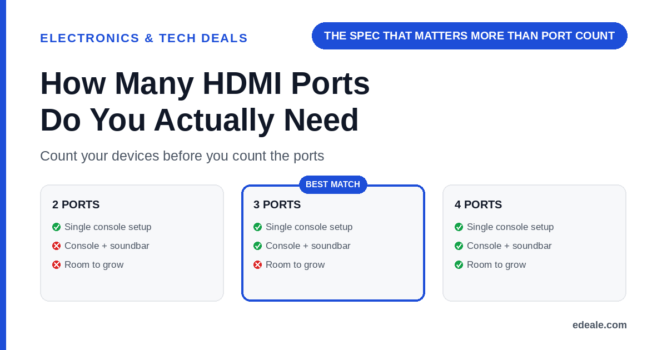
3 HDMI ports covers a common setup: one games console, one streaming device, and one for a soundbar or AV receiver. 4 ports gives room for a second console or a Blu-ray/DVD player without needing an HDMI switch. Beyond port count, check that at least one port supports HDMI 2.1 for a current-generation games console and eARC for the best soundbar audio.
Count What Actually Plugs In
What Actually Needs a Port
Many TVs include a mix of HDMI versions across their ports, with only one or two supporting the full HDMI 2.1 feature set (4K at 120Hz, variable refresh rate) needed for current-generation gaming. Check the manual or spec sheet for which specific port numbers support which features, not just the total count.
HDMI Version Matters More Than Count
A TV listed with '4 HDMI ports' sounds generous until you discover only one supports HDMI 2.1, meaning only one device gets the full 4K 120Hz and variable refresh rate experience current consoles are built for. The other ports may be older HDMI 2.0, fine for a streaming device or Blu-ray player but a genuine downgrade for a modern console. Always check the per-port specification, not just the headline port count, in the TV's manual or spec sheet.
What Is eARC, and Why Does It Matter?
eARC (Enhanced Audio Return Channel) lets a TV send high-quality, uncompressed surround sound back to a soundbar or AV receiver over the same HDMI cable, rather than needing a separate optical audio cable. If you own or plan to buy a soundbar that supports formats like Dolby Atmos, connecting through an eARC-capable port is what actually unlocks that audio quality. Standard ARC ports support audio return too, but with more format limitations than eARC.
TV HDMI Ports: Frequently Asked Questions
How many HDMI ports do I need for a typical home setup?
3 ports covers a common setup of one games console, one streaming device, and one soundbar. 4 ports adds room for a second console or a physical media player.
Does the HDMI version matter more than the number of ports?
Often, yes. A TV with more ports but only one supporting HDMI 2.1 still limits you to one device getting the full current-generation gaming experience.
What is eARC and do I need it?
eARC lets a TV send high-quality surround sound to a soundbar over HDMI. It matters if you own or plan to buy a soundbar supporting formats like Dolby Atmos.
Can I use an HDMI switch if I run out of ports?
Yes, and it’s cheaper than buying a new TV, though some switches introduce a small amount of input lag, which matters more for gaming than for a streaming device or Blu-ray player.
Do older HDMI ports still work with new devices?
Yes, they’re backward compatible, but you’ll lose access to newer features like HDMI 2.1’s 4K 120Hz or variable refresh rate if the port itself doesn’t support them.
Which devices should get priority for the best HDMI ports?
Current-generation games consoles benefit most from HDMI 2.1 ports; soundbars benefit most from eARC-capable ports.
Is 2 HDMI ports enough for most people?
It’s workable for a single console or streaming device plus one other, but tight if you also want a soundbar connected without an HDMI switch.
How do I check which HDMI ports on my TV support which features?
Check the TV’s manual or spec sheet, which typically labels each port number with its supported HDMI version and any ARC/eARC capability.
Key Takeaways
- Count your actual devices before choosing a port count. Console, streaming device, soundbar, and any extras add up faster than expected.
- HDMI version matters more than total port count. Check which specific ports support HDMI 2.1 for current-generation gaming.
- eARC unlocks the best soundbar audio quality. Standard ARC works too, but with more format limitations.
- An HDMI switch can solve a port shortage cheaply. Worth it for non-gaming devices; less ideal for a console due to potential input lag.
- 3-4 ports covers most common home setups. Match the exact number to your actual device count rather than buying based on habit.
For more real, verified picks across categories, see edeale's best wireless earbuds deals, best student laptop deals, and best streaming device deals.
edeale also tracks the Electronics & Tech Deals hub, the best VPN deals, and the best camera drones under $300 roundup, plus edeale's live, verified deals feed.
edeale also compares budget vs premium products and checks product compatibility before an accessory purchase becomes a return.
See Today's Verified Electronics Deals
Check edeale’s live, verified deals feed for current TV and home entertainment pricing.
Conclusion
Count your actual devices before deciding on HDMI port count, then check the HDMI version and eARC support of each specific port rather than trusting the total number alone. A TV with fewer, better-specified ports often serves a real setup better than one with more ports of mixed capability.