

 edeale
Plastic Pegboard Mouse Holder: A Small Accessory With One Job
A mouse bungee or dock holder solves a specific, small problem: cable drag pulling on your mouse mid-movement.
The listing we checked, the 2Pcs White Plastic Pegboard Mouse Dock Holder with Extra Hook for Accessories, is a 2-piece plastic pegboard mouse dock with an extra hook for accessories, designed to clip onto an existing pegboard system rather than stand alone. That’s worth knowing before buying, since it only works if you already have compatible pegboard hardware set up.
- What the real listing includes and how it attaches
- Why cable management matters more than it sounds for gaming mice
- Honest pros and cons based on the actual listing
- What to check before buying any pegboard mouse holder
- Whether you need existing pegboard hardware first
This review is part of edeale's Electronics & Tech Deals coverage. Pair this with edeale's review of an adhesive gaming pegboard shelf if you don't have pegboard hardware installed yet.
2Pcs White Plastic Pegboard Mouse Dock Holder with Extra Hook for Accessories
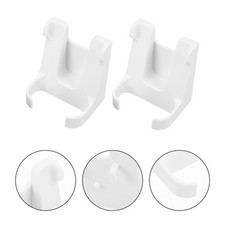
A 2-piece white plastic pegboard mouse dock holder with an extra accessory hook, designed to hold a mouse or its cable off the desk when clipped onto a pegboard system.
What the Listing Says
The holder is designed to clip onto pegboard hole spacing, not sit freely on a desk. If you don’t already have a compatible pegboard panel mounted, this accessory has nothing to attach to. Check edeale’s separate pegboard shelf review if you need the base system first.
Does Cable Management Actually Matter for a Mouse?
It sounds like a minor detail, but a mouse cable dragging against the desk adds real, measurable friction during fast movements, which competitive gamers specifically try to eliminate with dedicated mouse bungees. A pegboard-mounted holder like this one does a similar job for less money than a dedicated bungee stand, at the cost of needing existing pegboard hardware. For a wired mouse specifically, this is a genuinely useful, low-cost fix rather than a gimmick accessory.
Worth buying if you already have pegboard hardware mounted and use a wired mouse where cable drag is noticeable. Skip it if you don’t have a compatible pegboard system in place, or if you use a wireless mouse where this isn’t solving a real problem.
- Genuinely reduces cable drag for a wired mouse, a real functional benefit
- Cheaper than a dedicated standalone mouse bungee stand
- Extra accessory hook adds some additional utility beyond just the mouse holder
- Requires existing pegboard hardware — doesn’t work as a standalone accessory
- No benefit at all for a wireless mouse setup
- Plastic construction at this price point may not match the durability of a dedicated metal bungee stand
What to Check Before Buying
What to Check Before You Buy
Plastic Pegboard Mouse Holder: Frequently Asked Questions
Do I need existing pegboard hardware for this to work?
Yes. This holder clips onto an existing pegboard system’s hole spacing — it doesn’t stand alone on a desk.
Does this help with a wireless mouse?
No. Cable management accessories like this one are only useful for a wired mouse where cable drag is a real issue.
How many pieces come in this listing?
2 pieces, per the listing, plus an extra accessory hook.
Is this cheaper than a dedicated mouse bungee stand?
Yes, typically, though it requires pegboard hardware a standalone bungee stand wouldn’t need.
What's it made of?
Plastic, per the listing, in white.
Will this fit any pegboard I own?
Not necessarily — pegboard hole spacing varies between systems. Check the stated compatibility on the listing before buying.
What should I check before buying any pegboard mouse holder?
Whether you already have compatible pegboard hardware mounted, the stated hole spacing, and whether you actually use a wired mouse.
Does reducing mouse cable drag actually make a difference?
For fast, precise movements, yes — competitive gamers specifically address this with dedicated bungee stands, and a pegboard-mounted holder solves the same problem more cheaply.
Key Takeaways
- Requires an existing pegboard system. This doesn’t work as a standalone desk accessory — check compatibility first.
- Only useful for wired mice. No function at all for a wireless mouse setup.
- A genuinely cheaper alternative to a dedicated bungee stand. As long as you already have the pegboard hardware it needs.
- Check hole spacing compatibility before buying. Not every pegboard system uses the same standard.
- Cable drag reduction is a real functional benefit. Not just a gimmick accessory for fast mouse movements.
For more real, verified picks across categories, see edeale's best wireless earbuds deals, best student laptop deals, and best streaming device deals.
edeale also tracks the Electronics & Tech Deals hub, the best VPN deals, and the best camera drones under $300 roundup, plus edeale's live, verified deals feed.
edeale also compares budget vs premium products and checks product compatibility before an accessory purchase becomes a return.
Compare More Desk Setup Accessories
See edeale’s other pegboard and desk organisation reviews before you buy.
Conclusion
This plastic pegboard mouse holder is a genuinely useful, low-cost fix for cable drag on a wired mouse, but only if you already have compatible pegboard hardware mounted. Skip it for a wireless setup, and check hole spacing compatibility before buying if you’re not certain your pegboard system matches.